Minggu, 09 Juni 2013

New Advanced Technology of Graphic Card : Nvidia GeForce GTX Titan Introduction

Introduction

Are you "that guy"—the extreme gamer or hardware hoarder who always has to have the absolute fastest? There's no need to be ashamed: Just get out your full-to-bursting wallet, sign over your tax refund, or cancel that summer vacation, because it's hardware put-up-the-money time. Nvidia touts its new GeForce GTX Titan video card as the fastest single-GPU desktop graphics card ever. The company goes so far as to position this hyper-card as a key component to building the world’s first “gaming supercomputers.”

Drooling yet? We bet you are, but be warned: Get ready for more than just sticker stock—brace yourself for a sticker lightning bolt. The GTX Titan may notch up performance, but this über-card also boosts the entry fee to run in the extreme-GPU-performance stakes. The GTX Titan card itself costs $1,000, and boutique computers containing one, two, or three Titans cost much, much more. (Factor in a kilobuck per card, plus, well, the PC itself.)

Of course, this isn’t the first gaming card Nvidia has introduced at that luxury price point. The GeForce GTX 690, which is still available, retails at the same price, and in fact outperforms the Titan in some tests. But the GTX 690 is a dual-GPU card—that is, it has two of Nvidia's GK104 GPU units onboard, the same ones that are on the GeForce GTX 680, the single-GPU speed leader of not that long ago. As a result, the GTX 690 is a huge, demanding card whose design levies hefty power and cooling requirements, and doesn't lend itself to use in smaller, quiet PCs. The GTX Titan is no shrinking-violet card either, to be sure, but it's designed to operate in much tighter quarters.


A second consideration is with multiple video cards. (After all, you're in for one $1,000 video card...why not make it two or three?) You can combine a pair of dual-GPU GTX 690 cards to create a quad-SLI performance powerhouse, but the GTX Titan can be used in a triple-SLI configuration that, according to Nvidia's internal testing, is even faster. (We were not able to put this extreme-PC assertion to the test with GTX 690 cards, alas.) When you factor in the GTX Titan’s quieter, cooler performance, you realize these are actually two very different cards, for different needs, but at the same price point. They address different segments of the market in their own ways.


Along with the fastest single-GPU performance, the GTX Titan enables fast GPU-accelerated double-precision math support, the first time this feature from the company’s professional Tesla cards has appeared on a consumer model. It’s primarily of interest to developers, researchers, and students (you’re not likely to see games make use of it), but if the feature appeals to you, the GTX Titan offers a cheaper point of entry to high-precision GPU computing than the company's $2,000 to $3,000 Tesla cards.
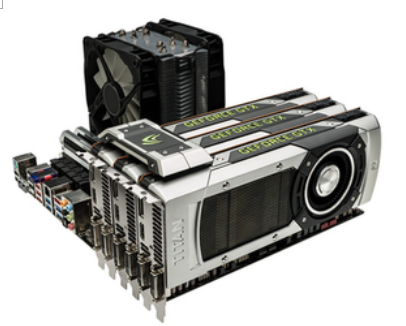


Three Titans in a triple-SLI configuration. (The dual-GPU GeForce GTX 690 supports "only" two cards.)


Note that the GeForce GTX Titan doesn’t herald the next generation of cheaper, mainstream graphics cards. The GTX Titan is based on the same Kepler architecture as the GeForce 600 series, but it boosts performance by bringing the massive design of Nvidia’s professional chips down to a consumer card. Nvidia’s is a brute-force approach: With 7.1 billion transistors (an Intel Core i7-3960X Extreme Edition CPU has only 2.3 billion), the GPU on the GTX Titan is a very large chip that achieves its performance by packing in an incredible 2,688 CUDA graphics-processing cores, compared to the 1,536 cores on the GeForce GTX 680 or the 960 on the consumer-priced GeForce GTX 660.


One thing the Titan does do for certain, though, is return the title of “fastest single-GPU graphics card” to Nvidia, a medal that AMD’s Radeon HD 7970 had previously stolen. Bragging rights have a lot do with why Nvidia built this card—and why some gamers will want to buy it. So here's the skinny on the Titan.


Specs, Architecture & Features


The GeForce GTX Titan is powered by Nvidia’s GK110 GPU, an evolution of the chip design used by the 18,688 Tesla GPU-computing cards that make up its namesake, the Oak Ridge National Laboratory’s Titan, which is the world’s fastest supercomputer. This enormous 28nm-process chip features 14 SMX units and 2,688 CUDA cores, compared to eight and 1,536, respectively, on the GeForce GTX 680. Along with additional processing power, the GTX Titan gets a performance boost by widening its memory path, giving it 50 percent more memory bandwidth to access graphics data. The chip features a 384-bit memory path (compared to 256-bit on the GTX 680) and a whopping 6GB of DDR5 RAM running at an effective 6GHz memory clock.


The stock GTX Titan runs at a clock speed of 836MHz, with a boost speed of 876MHz. Also, Nvidia has revamped GPU Boost, its automatic overlocking feature, to focus on GPU heat instead of power draw. The GPU Boost 2.0 feature employed by the Titan can potentially reach higher speeds than would have been possible with the previous boost feature. (Earlier cards' boost speeds would sometimes top out, even though the temperature environment still indicated some safe performance headroom; using thermal headroom as the metering factor here is more efficient.) More adventurous users can boost voltages and manually overclock the card to get even higher clock speeds. Models will be available with water-cooling blocks, and users of liquid-cooled systems will find that the temperature-based clock limits will allow them to push their GPUs even harder.


A view of the GTX Titan without its cooling hardware mounted, highlighting the SLI connector at top left and the GK110 GPU. Note the dual PSU connectors at top right.


Another feature of GPU Boost 2.0 is support for display overclocking, previously a relatively obscure branch of performance tweaking. Most mainstream LCD monitors refresh at a rate of 60Hz, which means that no matter how fast your video card can process frames internally, the monitor can only draw them 60 times a second. With GPU Boost 2.0, you can attempt to increase the refresh rate of your display manually to get a faster frame rate. Keep in mind, though, that some monitors won’t support any boost at all, while some 60Hz models may easily go up to 80GHz.


The GTX Titan is the first consumer card with significant support for GPU-accelerated 64-bit floating-point math, offering nearly 1.5 teraflops of performance for scientists, students, and others creating custom applications that can benefit from high-precision math. This isn’t a feature most gamers will notice, or even enable. Actually, activating the CUDA-Double Precision setting causes the GTX Titan card to run at a reduced clock speed.


Things get more interesting when you start considering these cards in pairs and trios. The GTX Titan supports Nvidia’s SLI multiple-card architecture, allowing you to install two or three GTX Titan cards in a single system with an SLI-supporting motherboard and enough PCI Express slots. According to Nvidia, three Titan cards in triple-SLI will outperform a pair of dual-GPU GTX 690 cards running in quad-SLI configuration, but at a hefty cost: $3,000 worth of video cards alone. (We've got a sampling of multiple-Titan-card performance specifics in the Performance section of this story.)


The backplane of the Titan reference board: two dual-link DVI, one HDMI, and one DisplayPort.


Note also that you’ll need a beefy power supply to run this card, with Nvidia recommending a minimum 600-watt power supply. You'll also have to pay attention to the available power connectors on the supply: The card requires both six-pin and eight-pin power connectors. The card has a Thermal Design Power (TDP) rating of 250 watts, so you’re looking at a 1,200-watt-minimum power supply if you're looking to run a triple-SLI setup. Of course, the cost of that new power supply will be the least of your expenses in such a PC build.

Ports & Features

Along with speed, another key goal in designing the GeForce GTX Titan was to create a cool, quiet card that could fit in small, high-performance PCs. (In the Nvidia Titan demo Computer Shopper attended, the card was demonstrated cranking away inside a Falcon Northwest Tiki system.) Its vapor-chamber cooler and single fan are designed to exhaust heat through the back of the computer. (The air is routed straight through the card and out the grille on the card's PCI-slot backplane.) That allows for much quieter, cooler operation than the GeForce GTX 690. You can adjust the card’s fan controller to prioritize acoustics or speed, allowing you to crank up the normally whisper-quiet fan if you’re trying to achieve maximum performance.

You'll also see some size "savings" with this card versus a GTX 690. Though the Titan is a big card (as you'd expect from the name!), at 10.5 inches it’s an inch shorter than the GTX 690. And it looks super: Nvidia's card partners may modify the cooler in their final retail versions of the Titan, but the company's reference design features a slick aluminum shell with a polycarbonate window that lets you view the vapor chamber and heat sink. It’s a classy design that befits the card’s luxury price.

Likewise, the port selection on the Nvidia reference design is well-chosen for what the typical buyer of this kind of card would expect. The reference card features a pair of dual-link DVI connectors, an HDMI port, and a DisplayPort connector. (The port selection may vary on some manufacturers’ cards, however.) Using these ports, you can drive up to four monitors simultaneously.

As you’d expect, the GTX Titan supports all of the features Nvidia has touted on lower-end GTX 600-series cards, including 3D Surround video, CUDA GPU-accelerated computation, PhysX physics technology, and TXAA temporal antialiasing. The card will also support mirroring its display on Nvidia’s upcoming Project Shield handheld gaming device.

Performance Testing

When comparing the GTX Titan’s performance to other high-end single-GPU graphics cards, tests run by our sister Web site PCMag.com show that it definitely earns its premium price relative to the competition.

Testing started with the 3DMark 11 synthetic benchmark at its Extreme setting. This test exercises a wide variety of the card’s DirectX 11 features. Here, the GTX Titan was dramatically faster than the AMD Radeon HD 7970 and the Nvidia GeForce GTX 680.

The card also easily bested both the Radeon HD 7970 and the GTX 680 in the new-for-2013 3DMark benchmark test (dubbed "3DMark FireStrike" for differentiation)...


Moving from synthetic benchmarks to real-world game tests, we saw clear performance boosts over earlier single-GPU cards, though in some cases they weren’t as significant as the results of our synthetic tests.

Metro 2033 is an extremely demanding game, particularly at the settings we tested at: maximum detail at 1080p resolution with both 4x antialiasing and 16x anisotropic filtering enabled. Here, the GTX Titan was almost 50 percent faster than the GTX 680, and the difference was still notable compared to the Radeon HD 7970...


On the Shogun 2: Total War test at maximum detail, 1080p resolution, and 8x MSAA, the GTX Titan again showed a marked speed increase over the "lower-end" cards. The performance increase means the game should be silky-smooth even at 2,560x1,440 resolution on a 27-inch monitor with every detail maxed out.


Finally, the Batman: Arkham City tests showed a notable increase over earlier cards. But all were so fast that the speed increase afforded by the GTX Titan would be most noticeable only when cranked up to even higher resolutions, when running in 3D, or if using multiple monitors.


Overall, the GTX Titan easily wrests the “fastest single-GPU card” crown back from AMD’s Radeon HD 7970. With rare exceptions, like Metro 2033, you’ll be hard-pressed to find many games that will push its performance to the limit, particularly in multi-card SLI setups, on a single monitor.

That was borne out in SLI testing. At the same time that it tested the GTX Titan, sister site PCMag.com also received a couple of desktop PCs equipped with two and three GTX Titan cards for testing in parallel. The Maingear F131 Super Stock, equipped with a pair of GTX Titan cards in SLI mode, scored a whopping 182 frames per second (fps) in our Aliens vs. Predator benchmark at maximum quality, with 4x AA and 4X AF enabled. Meanwhile, the other system, a Falcon Northwest Mach V configuration with a trio of GTX Titan cards, was even faster, clocking in at 222fps. Both of those results are dramatically faster than typical monitors can handle. SLI configurations of this card don’t really start to make a lot of sense until you start adding multiple monitors and/or 3D to the mix.

Conclusion

In the end, owning a GeForce GTX Titan is a bit like driving a Bugatti Veyron or Ferrari F40 on your daily commute. It provides the potential for extreme speed, but most of the time, you have to keep it pent up, with the world affording precious few chances to take advantage of it all. But, admittedly, it looks great (indeed, it's the slickest-looking graphics card we've ever seen, for those of you with windowed PC cases), and it gives you platinum-plated bragging rights over the other gamers on the road.


That said, if you’re just looking for the fastest single card that $1,000 can buy you, and PC-chassis space and power consumption are nonfactors, Nvidia’s GeForce GTX 690 remains the alpha-dog video card, with performance that’s a mite faster on games that can take advantage of its dual GPUs. But if you’re willing to drop thousands of dollars on a premium triple-SLI setup, or you want to build or buy a small, quiet single-card system, the GeForce GTX Titan steps into the lead.

In the end, the GTX Titan is as much about bragging rights as anything, for both gamers and Nvidia alike. Nvidia will only make a limited number of these cards, but the Titan lets the company reclaim the right to boast that it has the fastest consumer graphics cards available. Gamers will need to crank settings up to insane levels, pushing most games to the limit, to make a single GTX Titan break a silicon sweat on one monitor. You’ll likely need to delve into triple-monitor gaming to really justify the expense of a triple-SLI setup. But whether or not many current games can really take full advantage of its performance, the GTX Titan is the card, apart from the GTX 690, that will be able to make digital mincemeat of upcoming games for the longest time.

By Bayu Adi Prakoso NIM 125150207111084
TITLE : New Advanced Technology of Graphic Card : Nvidia GeForce GTX Titan


The First Online Programming School In Code.Org

Who Is Code.Org?

Code.org is a new initiative started by entrepreneurs Ali and Hadi Partovi. Their goal is to get U.S. schools to adopt more computer-science programs into their curriculum. Why? Because of the huge demand for programmers in the coming years. In fact, more than 1.4 million programming jobs (more jobs than they are students currently taking computer science courses in the U.S.) will be available in the next 7 years:


(Infographic: code.org)


“The realization is not enough people have these skills,” said Mark Zuckerburg, the founder of Facebook, who was in grade school when he started programming. “Whether you want to make a lot of money or just want to change the world, computer programming is an incredibly empowering skill to learn.” 


What The Significand of Code.org?


Drew Houston on coding: “It’s really not unlike playing an instrument or playing a sport or something. It starts out being very intimidating but you get the hang of it over time.”


Code.org
is a non-profit foundation dedicated to growing computer programming education. Our goals include:

Spreading the word that there is a worldwide shortage of computer programmers, and that it's much easier to learn to program than you think.
Building an authoritative database of all programming schools, whether they are online courses, brick+mortar schools or summer camps.

Our vision is that every student in every school has the opportunity to learn how to code. We believe computer science and computer programming should be part of the core curriculum in education, alongside other science, technology, engineering, and mathematics (STEM) courses, such as biology, physics, chemistry and algebra.


Code.org Concept


Code.org’s “What Schools Don’t Teach” features a who’s who of techdom.

The best thing about Code.org is that they are spreading the word really well about why coding is important, fun, accessible, and relevant.

They have done a great job getting famous people to help spread the word, which is really important. Especially having people like Chris Bosh and will.i.am to give a perspective from popular culture.

Also, they've done a great job compiling resources for learning to code, including my website, CodeHS, which has gotten a lot of traffic from code.org, so they're doing something right!

Title : The First Online Programming School In Code.Org
By : Bayu Adi Prakoso, NIM : 125150207111084

Technology of Sport

Hours Referee Third Eye
Andy Kurovet a designer, make-hour special for soccer referees called Referree Third Eye is equipped with Bluetooth so reserve assistant referee to referee can directly send a signal if it occurs goal, offside or violation. This is because the referee controversy is less precise decisions.


Ball CTRUS
CTRUS ball is a ball that is equipped with a camera in it so it can send a signal so that it can send a signal to a special device worn jikakalau referee has occurred goals. But Football Federation refused to use the grounds will ruin the beauty of football.Micoach


Micoach
MiCoach is the first technology smart shoes which are used to determine and record the performance statistics for speed, maximum speed, number of sprints, distance, distance based on the time and level of intensity accurately. 
Technology originating from German sports is widely used by footballers, tennis players, athletics and many others.  
MiCoach memory can record all the data matches up to 7 hours and can be transferred wirelessly to tablets, PC, and MAC.

source: lihat.co.id


Title : Technology Of Sport
By : Irsyad Fauzan N, NIM : 125150200111040

7 Disease Due to Technological Progress

7 Disease Due to Technological Progress
Technology does offer convenience in the activity. But convenience is not necessarily without consequence. Studies have found there are some health problems caused by the use of technologyin everyday life ranging from depression Facebook to narcissism.
Tenth diseases due to technological advances as reported DailyRecord, among others:
1. Electromagnetic waves of hypersensitivity to Wifi Signal Phone
From Wi-Fi to cellular signals, people are surrounded by wireless communication. And for some people, exposure to electromagnetic fields can make sick. Symptoms range from acute headaches and skin burning up muscle-twitching and severe pain.
An estimated 5 percent of Americans believe that they suffer from this condition and some of them have moved away to areas where wireless communication can dikonrtol strictly controlled to avoid problems.
2. Depression FacebookAwal this year, a group of physicians in the United States warned that teens can become so obsessed with Facebook and sacrificing his health.
American Academy of Pediatrics states that neglected children on social networking sites will be more depressed than ignored in real life.
The organization warned of the risk of mental health of children who are victims of cyber-bullying and confirmed that the use of a website in the long term can affect sleep patterns and levels of self-esteem.
3. Repeated Strain Injury which caused a lot of typing on the keyboard
Usually factory workers, seamstresses and musicians is the most at risk of developing repetitive strain injuries. But this time the office workers can suffer from the same problem because of spending too much time using the keyboard.
The use of fingers, wrists, arms, and shoulders repeatedly can cause damage that can not be repaired by the body over time. Preventative measures such as regular breaks is strongly recommended.
4. Headaches Due to Mobile
For years, experts engaged in a fierce debate over whether cell phones dangerous or not. However, studies have shown no association between headaches and the use of mobile phones.
Research commissioned by mobile phone manufacturer in the year 2008 and found that the phone calls just before bed can affect sleep quality can cause headaches the next day.
5. Internet addiction
Many psychiatrists now offering treatment for internet addiction and has been treating patients who say that the online world has taken over his life.
According to U.S. psychiatrist, Jerald Block, the condition must be seen as a clinical disorder see the increasing number of people are addicted to gaming and pornography on the intenet.
6. Reduced Hearing instruments
As a result of disease Ipod like Ipod Some diseases may be a new technology on the fret over the last 10 to 15 years. Yet it is more than 30 years since it was first raised concerns that listening to loud music through speakers may damage your hearing.The ipod has replaced the Walkman, but concerns remain the same. France has banned the gadget manufacturers to produce the earphones which produce the sound exceeds a certain level.
7. Injury when Main Nintendo Wii
When the Nintendo Wii was first released, people of all ages are excited to try out this game which replaces the 'stick' is ancient. The problem is many people who enjoy playing Wii games to lose track of time, causing muscle spasms.
source: terselubung.blogspot.com

ADDITIONAL (Hot News!)Type Women Seen From Technology
Recently World Computer Scientist Journal conducted a survey of the computer scientist an eye on how they view women, the results were as follows:
1. CPU Type: smart, a thinker, not a lot of talking but doing a lot of things, (secretly tau-tau was 7 months ...).
2. Type of Monitor: flirty, happy note, like to show off, (though not necessarily a good dipamerin).
3. Keyboard Type: happy-held, pressed and squeezed in a variety of locations (watch out, one can press the hang) 
4. Printer Type: active, pressed a little more movement, noisy when in use, (does not fit in the type 21 ato 'RSS, disturbing the neighbors).
5. Type of Mouse: fitting and comfortable grip, icy-cold soft!.
6. Type of Windows: outside looks good, it full of bugs.
7. Linux-Console type: outside looks ugly, it 'reliable.'
8. XWindow type: outside in can be reliable.
9. DOS type: Face .... not pretty, not necessarily a good heart! 
10. UNIX Type: stealthy, multi-user. 
11. PLC types: large and stocky bodies, able to work in a dirty place, 24 hours a day, 365 days a year for 30 years nonstop. 
12. Type Windows NT: multi-user, can previlleges costumized. 
13. Type of Windows Vista: always up to date, exclusive, not carelessly accept cowoq, especially pirated ... and up ...
14. Type of Windows 7: similar to Windows Vista but flexible, accept men or women ... important affection ...

Sources: http://muka-aneh.blogspot.com/2009/11/tipe-wanita-dilihat-dari-teknologi.html

Title : 7 Disease Due to Technological Progress
By : Irsyad Fauzan N, NIM : 125150200111040

Video Game

And now,I will tell you about video game,please read  :
A video game is an electronic game that involves human interaction with a user interface to generate visual feedback on a video device. The word video in video game traditionally referred to a cathode ray tube (CRT) display device,but it now implies any type of display device that can produce two or three dimensional images. The electronic systems used to play video games are known as platforms; examples of these are personal computers and video game consoles. These platforms range from large mainframe computers to small handheld devices. Specialized video games such as arcade games, while previously common, have gradually declined in use. Video games have gone on to become an art form and industry.
The input device primarily used to manipulate video games is called a game controller, and varies across platforms. For example, a controller might consist of only a button and a joystick, while another may feature a dozen buttons and one or more joysticks. Early personal computer games often needed a keyboard for gameplay, or more commonly, required the user to buy a separate joystick with at least one button.Many modern computer games allow or require the player to use a keyboard and a mouse simultaneously. A few of the most common game controllers are gamepads, mouses, keyboards, and joysticks.
Video games typically use additional means of providing interactivity and information to the player. Audio is almost universal, using sound reproduction devices, such as speakers and headphones. Other feedback may come via haptic peripherals, such as vibration or force feedback, with vibration sometimes used to simulate force feedback.
In the early days of cartridge consoles, they were sometimes called TV games.

That’s the description from video games,now I will tell you the history about video games :
Early games used interactive electronic devices with various display formats. The earliest example is from 1947—a "Cathode ray tube Amusement Device" was filed for a patent on 25 January 1947, by Thomas T. Goldsmith Jr. and Estle Ray Mann, and issued on 14 December 1948, as U.S. Patent 2455992.
Inspired by radar display tech, it consisted of an analog device that allowed a user to control a vector-drawn dot on the screen to simulate a missile being fired at targets, which were drawings fixed to the screen.
Other early examples include:
Each game used different means of display: NIMROD used a panel of lights to play the game of Nim,OXO used a graphical display to play tic-tac-toe Tennis for Two used an oscilloscope to display a side view of a tennis court,and Spacewar! used the DEC PDP-1's vector display to have two spaceships battle each other.
In 1971, Computer Space, created by Nolan Bushnell and Ted Dabney, was the first commercially sold, coin-operated video game. It used a black-and-white television for its display, and the computer system was made of 74 series TTL chips.The game was featured in the 1973 science fiction film Soylent Green. Computer Space was followed in 1972 by the Magnavox Odyssey, the first home console. Modeled after a late 1960s prototype console developed by Ralph H. Baer called the "Brown Box", it also used a standard television.These were followed by two versions of Atari's Pong; an arcade version in 1972 and a home version in 1975 that dramatically increased video game popularity.The commercial success of Pong led numerous other companies to develop Pong clones and their own systems, spawning the video game industry.
A flood of Pong clones eventually led to the video game crash of 1977, which came to an end with the mainstream success of Taito's 1978 shooter game Space Invaders,marking the beginning of the golden age of arcade video games and inspiring dozens of manufacturers to enter the market.The game inspired arcade machines to become prevalent in mainstream locations such as shopping malls, traditional storefronts, restaurants, and convenience stores. The game also became the subject of numerous articles and stories on television and in newspapers and magazines, establishing video gaming as a rapidly growing mainstream hobby.Space Invaders was soon licensed for the Atari VCS (later known as Atari 2600), becoming the first "killer app" and quadrupling the console's sales.This helped Atari recover from their earlier losses,and in turn the Atari VCS revived the home video game market during the second generation of consoles, up until the North American video game crash of 1983.The home video game industry was revitalized shortly afterwards by the widespread success of the Nintendo Entertainment System,which marked a shift in the dominance of the video game industry from the United States to Japan during the third generation of consoles.


Title : Video Game
By : Kholif Beryl Gibran, NIM: 125150207111086

Benefit Playing Video Games

Okay Guys,in this section I will explain about benefit playing video games.
When it comes to video games, many parents are so protective of their children, and they do this for a good reason. When you allow your child to play action games randomly, they could be exposed to bad things including coarse language, nudity, gross violence and brutality. Nevertheless, not all action games are bad. In fact, playing action games can benefit both children and adults in various ways. Before you or your children play free games that involve action, ensure they are suitable. Some of the benefits of playing these games are surprising, and include:

Quick and accurate decisions
Some scientific researchers have now discovered that there is a strong connection between playing fast-paced action games and making fast, accurate decisions. Children who play these games are able to make sound decisions quickly when faced with challenges in their daily lives. Of course, every parent wishes that their children should learn to make solid decisions on their own.

Enhances hand-eye coordination
Researchers have also determined that the games improve the player's hand-eye coordination. You need a good hand-eye coordination to perform various daily activities excellently such as driving, typing, cleaning and many other tasks. Research has shown that surgeons who play action games have exceptional surgery skills compared to those who do not play.

Improves visual searching
Playing games that have plenty of action boost your visual searching skills. No one has ever considered this benefit before because many know little about the benefits of visual searching. Surprisingly, this skill is essential in many aspects of life such as when locating friends in a crowd, overcoming camouflage during war, interpreting satellite images, screening baggage and reading MRIs or X-ray scans.

Promotes social skill and collaboration
In the past, gamers were often stereotyped as lonely people sitting in a corner with a game pad on their hand glued to their screen. However, due to the introduction of online multi-player games, this is no longer the case. Playing these games encourages collaboration and promotes social skills. Many of the games online require the player to collaborate with another player to be victorious. Some online sites even provide platforms such as live chat, which allow the player to communicate with other players and share tips.

Spatial reasoning skills

Some of them enable your child to develop excellent spatial-reasoning skills, which enable them to have a higher IQ. This also enhances mental manipulation and navigational skills.

Title : Benefit Playing Video Games
By : Kholif Beryl Gibran, NIM: 125150207111086

Computer For Gamer

Hey gamers! After a review of the types of computer. Here it is part of a very interesting technology for you gamers. For gamers who have never missed "homework" you (meaning finishing the game) is certainly in need of a qualified technology devices for all that.
And now of this article will provide a very useful information for computer gamers to choose carefully.
Before that, we need to know what type of computer is required by gamers. computer devices for gaming in general consists of two types, namely computers and laptops. depends on all of you gamers, more comfortable using a computer or laptop.

Computer for gaming
You certainly know your computer right? Of course, the computer is a device technology
will consist of a CPU, monitor, keyboard, mouse, and speakers are mounted separately.

As in the picture :  


            Computer is already common to all people, especially for gamers. It's just that, speksifikasi it was more sophisticated computer than on a laptop, it is natural that gamersprefer the computer than a laptop. 

For examples of the best computer in 2013 which is very capable to play the game:

One-stop gaming and entertainment system.

Experience epic gaming and entertainment on a compact gaming desktop available with up to 3rd Gen Intel® Core™ processors and HD graphics.

Optional upgrade to Windows 8 available. Equipped with the new NVIDIA® GeForce® GTX 645 graphics card, enjoy 1080p HD Gaming with our most compact desktop, ever.
  • Dell Price $69900
Estimated Ship Date:17 Jun 2013
  • Intel® Core™ i3-3220 3.3GHz (3MB Cache) with Hyper-Threading and Turbo Boost Technology 2.0
  • Windows® 7 Home Premium, 64Bit, English
  • 6GB1 DDR3 SDRAM at 1600MHz
  • 1TB SATA 3Gb/s (7,200RPM) 32MB Cache
  • 1GB GDDR5 NVIDIA® GeForce® GTX 645
  • No Monitor
  • 1 Year Alienware Basic Support


Laptop for gaming
One type of computer device that has the same device with the computer just any part that is in the laptop is not plugged in isolation but rather directly into one piece.

As an example in the picture :

You certainly know that the laptop makes it easy for users. Maybe this is probably one of the reasons why gamers choose the laptop as a device for playing games.


          Although the laptop makes it easy for gamers, it's just that we as gamers should be careful in choosing our gaming needs. This is so that when we play a game that suits our level in order to avoid damage to the laptop that we have chosen or may choose a laptop that we have such a slow and heavy to play the game, and eventually we are not satisfied and loss. Most of us choose a computer device for gaming surely we must understand the specifications, and especially how we get a laptop for gaming that has a specification that is qualified and fit our desires with very cheap price.


Examples of special laptop to play games with highly qualified specifications:

ROG Tytan G30 dekstop and G750 notebook

The ROG Tytan G30 gaming desktop uses automatic case ventilation control and liquid CPU cooling for efficient heat dissipation, increased operating stability and reduced noise. The extreme performance of its 4th generation Intel® Core™ i7-4770K processor can be fully exploited with one-click overclocking of all four cores on the fly, while NVIDIA® GeForce® GTX 780 graphics ensure smooth gameplay with the highest detail settings in games.

Of the existing types of computer devices, for gamers of course require additional equipment used to play the game. All it is a keyboard, mouse, and do not forget to thrill the world game atmosphere was speaker.

Keyboard is one of the most important equipment in the game play, because the keyboard is always used to drive a game character or commonly performed by gamers is the inclusion of cheating. This fraudulent means to enter a code to make it easier for gamers to finish the game.

Mouse certainly can not be overlooked by gamers. Because the mouse is described as the god spear in winning a game. Mouse for gaming should have a very strong resistance specification, because the mouse is one of the very active equipment used when playing the game. Most games have to use the mouse. And for every use of the mouse to be equipped with a dedicated gaming mouse pad as well, because not all of the same mouse pad. Special gaming mouse pads have a friction resistance of the mouse itself. Exception for console games, this game does not have to use the mouse but can use the keyboard only.

             Speaker is a sound component especially for gamers or the gaming world giving mood more profound sensation of longer provide sound effects the game itself to gamers. In this case, not only the speaker intended. But for gamers who want to feel the atmosphere
of the game itself, they used to use headphones. The headphones are noise components are also mounted directly head. Headphones is also there is who special gaming. Because it has a sharp sound headphone that gives more effect for gamers.


All the equipment was very supportive for gamers. So, for those of you who want to be a gamer, all it has become imperative if you really - really want to be a gamer.
Suggestions for you gamers choose a computer or laptop to play games, always pay attention to the specs either. Do not be easily tempted to a high specification, because we also have to think about finances we have. So choose standard specifications for the game, especially for the computer. Computer components can be upgraded according to our will, so at the beginning we buy a computer should probably choose a standard but can play the game.
Gamers if you want to buy a laptop, look for a high specification with a minimum of 2.0 ghz processor. And do not be pegged on its vga, as vga least 1 gb is enough. Most important note from the vga chip and brand itself. For quite a while at least 2 gb ram, because ram can we upgrade the ram chip depends on the match itself. Hopefully what's in this article could be useful for you gamers.

Title : Computer for Gamer
By : I Made Yoga Aryasa, NIM : 125150207111088